
Jev: The New Model Idea That Took the World by Storm

Last month, TypeSafe AI emerged from two years in stealth and came out swinging. They introduced a new class of AI models called System One Models, with Jev as the first public model in this family. Their vision is simple: build AI models that work for computers, instead of hammering chatbots into that role. In fact, their motto puts it bluntly:
We're building prod, not God.
Source: TypeSafe AI's manifesto
The founder is none other than Diogo Almeida, one of the co-authors of the InstructGPT paper. This research showed how to train language models to better follow people's instructions. That was a key step toward making ChatGPT useful. Having helped make AI better at responding to people, he's now turning his attention to making it work better for computers.
Change of Paradigm
The idea behind Jev is simple: when a person asks an AI a question, an answer in everyday language usually does the job. But when a program asks, it often needs the answer in a structured format like JSON. Think of it as a form with labeled fields, where the program knows exactly where to find each piece of information. Instead of interpreting a paragraph, it can read those fields and use them directly.
The contrast becomes clearer in the example below. It shows the kind of trick we often use to force a chatbot to produce a machine-friendly response, by spelling out the exact JSON structure we want instead of letting it answer naturally.
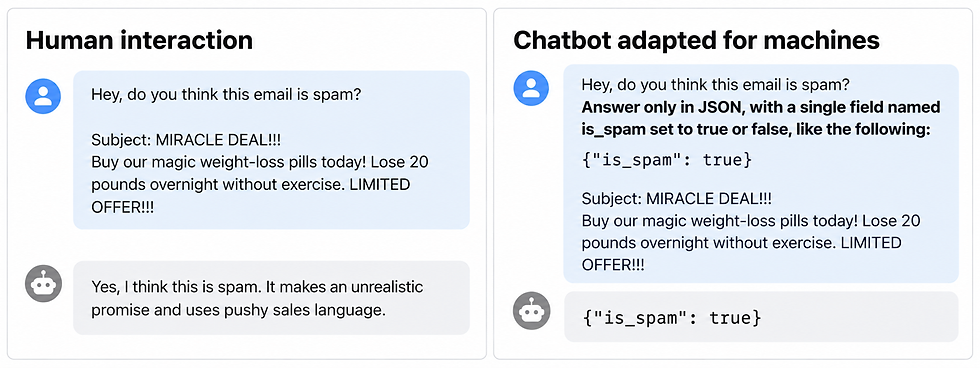
These are illustrative responses. The question and email are the same, but the JSON instruction changes the shape of the answer.
We can get models like those behind ChatGPT and Claude to return structured answers. That is how many AI tools work today. But it is a bit of a hack. We ask a model built to generate language to speak in a format a program can parse, then add extra code to catch it when it does not.
Here are three common failure modes:

Diogo's idea is to build a model around that need from the start. What if it could understand the situation and return a structure the program can use directly, without generating a conversational reply? That's the approach behind Jev. By giving up free-form text generation, TypeSafe aims to make those calls much faster and cheaper. The output already has the shape the program expects. TypeSafe's explanation
This is a change of paradigm:
Jev does not chat. It brings language-model intelligence to software. It makes decisions.
A typical interaction with Jev looks like this. The model receives a structured state and question, then returns a machine-readable answer. Here, it classifies the email as spam with 98% probability.

By choosing this tradeoff, Jev can help a cheaper model approach the quality of a much larger reasoning model.
TypeSafe's docs show this in a direct cost-versus-quality comparison of GPT-5.4-mini, GPT-5.4, GPT-5.5, and GPT-5.5-reasoning. The blue points are cascade configurations that use Jev as a verifier. TypeSafe labels the chart as an internal historical snapshot.

Understanding Jev's Language
A Jev request needs two sections:
state: the information Jev should examine
questions: the judgments Jev should make
Jev returns one section:
answers: the results for those questions
The request itself is one JSON object:
{
  "state": { ... },
  "questions": { ... }
}
State
The state is the information Jev needs to make its judgment. It can be an email, a support ticket, a document, or any other JSON data your application wants to evaluate.
{
  "email": {
    "subject": "MIRACLE DEAL!!!",
    "body": "Buy our magic weight-loss pills today!"
  }
}
Questions
The questions are the judgments you want Jev to make about that state. Each question has an ID you choose. Inside it, type defines the kind of answer you want, instructions says what Jev should judge, and criteria defines the possible answers when needed. As per now, there are three types of questions:
noul
choice
score
Noul
Use noul for a yes-or-no question. The question defines what yes and no mean:
Noul comes from Bernoulli, a probability distribution for yes-or-no outcomes.
{
  "is_spam": {
    "type": "noul",
    "instructions": "Is this email spam?",
    "criteria": {
      "true": "The email is spam",
      "false": "The email is not spam"
    }
  }
}
Jev returns one number from 0 to 1. It is the probability that the answer is yes:
{
  "is_spam": {
    "type": "noul",
    "noul": 0.98
  }
}
A value near 1 means a strong yes. A value near 0 means a strong no. A value near 0.5 is uncertain.
Choice
Use choice when the answer must be one item from a fixed list. The criteria are an object whose keys are the values your code can act on.
{
  "request_type": {
    "type": "choice",
    "instructions": "What is the main request?",
    "criteria": {
      "refund": "The customer wants money returned",
      "rebooking": "The customer wants a replacement flight",
      "information": "The customer only wants information"
    }
  }
}
Jev returns the selected key, probabilities for all options, and a confidence value:
{
  "request_type": {
    "choice": "refund",
    "probabilities": {
      "refund": 0.91,
      "rebooking": 0.06,
      "information": 0.03
    },
    "confidence": 0.91
  }
}
Probability describes each possible answer. In this example, Jev assigns 0.91 to refund, 0.06 to rebooking, and 0.03 to information.
Confidence summarizes how strongly the probabilities favor one answer. It is high when one option clearly leads and lower when the options are closer together. It can happen to equal the top probability, but it is a different measurement.
Score
Use score when the answer belongs on an ordered scale. The criteria are an array, listed from low to high.
{
  "urgency": {
    "type": "score",
    "instructions": "How urgent is this ticket?",
    "criteria": [
      "Routine",
      "Needs attention today",
      "Critical"
    ]
  }
}
Jev returns a score, the scale it used, probabilities for each level, and confidence:
{
  "urgency": {
    "score": 1.7,
    "legend": [
      "Routine",
      "Needs attention today",
      "Critical"
    ],
    "probabilities": {
      "0": 0.05,
      "1": 0.25,
      "2": 0.70
    },
    "confidence": 0.70
  }
}
Answers
You can send several questions about the same state in one request:
{
  "state": {
    "ticket": "My payment failed and I need help urgently."
  },
  "questions": {
    "request_type": {
      "type": "choice",
      "instructions": "What is the customer's main request?",
      "criteria": {
        "billing": "The customer needs help with a payment",
        "technical": "The customer reports a technical problem",
        "account": "The customer needs help with their account"
      }
    },
    "is_urgent": {
      "type": "noul",
      "instructions": "Is this request urgent?"
    }
  }
}
Jev returns one answer for each question, using the same IDs:
{
  "answers": {
    "request_type": {
      "choice": "billing",
      "probabilities": {
        "billing": 0.94,
        "technical": 0.04,
        "account": 0.02
      },
      "confidence": 0.94
    },
    "is_urgent": {
      "noul": 0.87
    }
  }
}
The first answer routes the ticket to billing with a 0.94 probability. The second says the request is urgent with a 0.87 probability. Your application can use those values to send the ticket to the billing team and decide whether it needs immediate attention.
Python Example: A Review Classifier
Suppose we want to classify a product review in two ways. First, we want to know whether the sentiment is positive, neutral, or negative. Then we want to check whether the review appears to be genuine or spam.
Set Up an API Key
Create an API key in the TypeSafe console:
Open API Keys in the console.
Choose Create key and give it a name.
Copy the key immediately. TypeSafe shows it only once.
Store the key in the TYPESAFE_API_KEY environment variable before running the script:
export TYPESAFE_API_KEY="your-api-key"TypeSafeClient() reads this variable automatically. Keep the key out of your code and never commit it to a repository.
Prepare the Python Environment
We recommend using uv to manage Python versions, projects, scripts, and environments. RidgeRun.ai's uv tutorial explains how to install and get started with the tool.
Create a script and add the TypeSafe SDK:
uv init --script review_classifier.py
uv add --script review_classifier.py typesafe-sdk
Run the Classifier
from typesafe_sdk import Choice, Noul, TypeSafeClient

state = {
    "review": "The battery died after two days, and support never replied."
}

with TypeSafeClient() as client:
    response = client.system_one(
        state=state,
        questions={
            "sentiment": Choice(
                instructions="What is the sentiment of this review?",
                criteria={
                    "positive": "The review is clearly favorable",
                    "neutral": "The review is mixed or neither favorable nor unfavorable",
                    "negative": "The review is clearly unfavorable"
                }
            ),
            "is_real": Noul(
                instructions="Is this review genuine rather than spam or fabricated?"
            )
        }
    )

sentiment = response.answers["sentiment"].choice
is_real_probability = response.answers["is_real"].noul

print(f"Sentiment: {sentiment}")
print(f"Probability that the review is genuine: {is_real_probability:.2f}")
Read the Output
Run the script with uv:
uv run review_classifier.pyOutput:Sentiment: negative
Probability that the review is genuine: 0.75The application now has two typed results. sentiment contains one of the three labels. is_real_probability contains the probability that the review is genuine. It can use those values to sort reviews, flag suspicious ones, or send uncertain cases for human review.
Closing Remarks
Since Jev's release, the idea has started to spread. Cloudflare's Clef and Clef-flash follow the same basic pattern: give the model state and typed questions, then get structured answers back. OpenAI's Decisions API takes a similar path with predicate, choice, and score questions that return typed answers.
The open-source community is moving too. Projects such as Kev, Jev-Style, OpenJev, Plumb-4B, and Decider are exploring local models, compatible APIs, and different training recipes. They are not identical implementations, but they share the same direction.
The important part is the thinking outside the box. Instead of asking how to force a chatbot to behave like software, we can ask what a model built for software should look like. Once you stop forcing a chatbot to talk and let a model return the decision directly, a much wider design space opens up.
Have an AI project in mind? Contact RidgeRun.ai at support@ridgerun.ai.

Comments